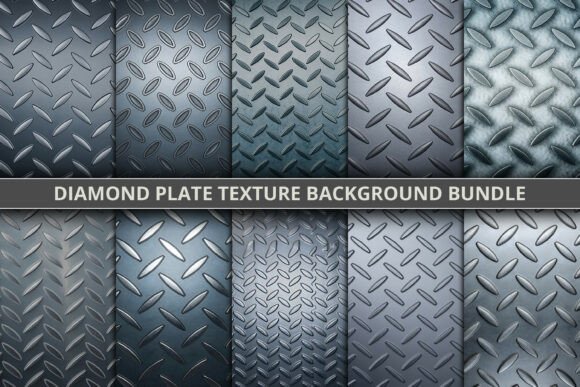
Diamond Plate Texture Background Bundle
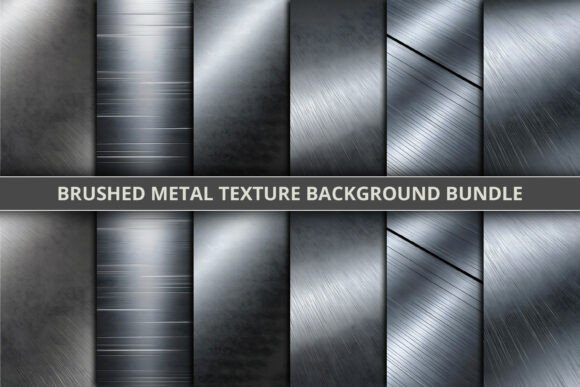
Industrial design has never looked this good. The Diamond Plate Texture Background Bundle brings a bold, tactile edge to your creative work with a curated collection of ten high-resolution textures, each measuring up to 7054x4703 pixels. These aren’t just background images—they’re immersive surfaces that echo the strength and character of real-world metal finishes. From diamond plate to tread plate and checker plate patterns, each texture is rendered with precision to reflect the depth, grain, and visual weight of industrial steel.
What sets this bundle apart is its versatility. Whether you're designing a rugged product label, a high-impact poster, or a modern website layout, these textures add a layer of realism and sophistication that flat colors simply can't match. The grayscale palette—ranging from cool silver tones to deep charcoal greys—makes them incredibly adaptable for both light and dark design schemes. You can subtly integrate them into editorial layouts or let them take center stage in branding materials that demand attention.
Where These Textures Shine
The Diamond Plate Texture Background Bundle works especially well in design contexts that benefit from a tactile, industrial aesthetic. Here are a few standout applications:
- Brand identity – Add a strong visual anchor to logos, business cards, or packaging for brands in construction, automotive, or lifestyle niches.
- Editorial design – Use in magazine spreads or book covers where texture enhances storytelling and visual interest.
- Web and UI design – Incorporate as background elements for buttons, banners, or hero sections to create a modern, tech-forward feel.
- Packaging design – Especially effective for product boxes or labels that need to communicate durability and premium quality.
- Social media graphics – Use as overlays or base layers to give your visual content a distinctive, on-brand look.
Designing with Industrial Texture in Mind
When integrating these textures into your work, consider the balance between visual impact and readability. The raised diamond patterns and anti-slip metal finishes add dimension, but they can also compete with text or other design elements if not used thoughtfully. A good rule of thumb is to apply them as background layers rather than dominant visual elements, especially in content-heavy designs.
For brand identity and logo design, use these textures sparingly to reinforce a brand’s personality—particularly for brands that want to project strength, innovation, or a hands-on, industrial edge. In web design, consider using them as subtle background overlays for call-to-action sections or hero banners to add depth without overwhelming the user.
Choosing the Right Texture for Your Project
Not every texture in the Diamond Plate Texture Background Bundle will suit every project. Start by evaluating the tone and purpose of your design:
- Consider the mood – Silver-toned textures feel sleek and modern, while grey metal backgrounds convey solidity and reliability.
- Test for contrast – If you're placing text over a texture, ensure there's enough contrast to maintain readability.
- Match the brand voice – Industrial textures work best for brands that want to communicate strength, craftsmanship, or innovation.
- Think about scale – Larger patterns can dominate a layout, so adjust the size and opacity to fit the context.
Pairing Textures with Typography
One of the most powerful design techniques is combining textures with typography to create visual hierarchy and emotional impact. For instance, pairing a clean, modern sans serif font with a rugged diamond plate texture creates a compelling contrast between soft and hard elements. Alternatively, a bold display font over a subtle checker plate background can give your design a strong focal point without feeling cluttered.
When experimenting with font pairing, always test your combinations in the actual design environment. What looks good in a preview might not hold up in a real-world application, especially when textures are involved. Use layer blending modes like overlay or soft light to integrate textures more naturally with typography and other design elements.
Practical Tips for Using This Texture Bundle
Here are a few practical considerations to keep in mind when using the Diamond Plate Texture Background Bundle:
- Licensing – Make sure to verify the commercial use rights, especially if you're using the textures in client work or for resale products.
- File formats – Check the available file types—high-res JPEGs or PNGs are ideal for print and digital use respectively.
- Layer effects – Experiment with blending modes, masks, and opacity adjustments to get the most out of each texture.
- Consistency – Stick to one or two textures per project to maintain a cohesive visual style.
- Testing – Always preview your designs on different screens and in print to ensure texture details remain visible and effective.
Whether you're a designer, marketer, content creator, or small business owner, the Diamond Plate Texture Background Bundle offers a versatile toolkit for elevating your visual storytelling. It’s more than a collection of backgrounds—it’s a way to inject authenticity, depth, and industrial character into your creative work.